

A single-location operator, airport rental company, franchise network and app-based rental model all need different levels of booking, fleet, pricing, payment, customer journey and distribution support. The right system should keep availability, rates, vehicle classes, extras, policies and bookings consistent across your branches and approved sales channels, while reducing the manual fixes that usually slow teams down.
Who This Guide is For
This guide is for rental operators and rental networks comparing car rental technology, including:
- Independent rental operators running single or multiple locations
- Franchise and affiliate networks that need central oversight with local execution
- Operators that sell through brokers, OTAs, affiliates, airlines, wholesalers, comparison sites or corporate travel portals
- Operators adding digital booking, digital check-in, keyless rental, payments or customer journey tools
- Teams moving off spreadsheets or legacy systems and into modern software
- Managers evaluating rental booking software, fleet tools, distribution APIs and rental management systems for their business
Each group will have different priorities, but this guide keeps the rental operator view at the center. Brokers, OTAs and airlines are treated mainly as sales channels or partners, not as the primary software buyer.
What Car Rental Software Is
“Car rental software” covers several related categories:
- Rental booking software – This is a reservation engine used by customers, partners, or agents through web or mobile channels that shows cars, rates and dates, and lets customers book and pay online. It must show real-time availability and upsells.
- Car rental management software – The back-office system that runs branch operations: allocating vehicles, creating contracts, collecting insurance info, and handling returns, maintenance and accounting. Think of it as the business’s operational backbone.
- Distribution software or platform – A connectivity layer between your rental inventory and external sales channels. A car rental distribution API sends your live availability, rates, vehicle classes, extras, location rules and booking conditions to brokers, OTAs, affiliates, airlines, wholesalers, comparison sites and other approved partners. Bookings should flow back into the same reservation system.
- Car rental API – The technical interface, usually REST or XML, that lets your rental system exchange data with websites, mobile apps, partners and internal tools. For operators, an API-first setup matters when booking, pricing, fleet, payments, telematics, accounting, customer journey tools and distribution channels need to share data.
- Fleet management tools – Systems or modules focused on tracking and maintaining vehicles: odometer, fuel/charge level, damage logs, and service schedules. Some dealers or fleet systems specialize in this and can feed data into your rental system.
- Customer journey tools – Features that enhance the rental experience: online check-in, digital contracts, ID verification, and keyless access (mobile apps, connected cars, digital keys). These may be part of your rental management system or offered by specialized providers.
A complete car rental management solution may bundle many of these functions, or you might connect specialist tools through APIs. For example, an operator could use one system for reservations, a payment gateway for transactions, an accounting tool for invoices and a telematics provider for vehicle data. When comparing vendors, clarify exactly which pieces are included, which are integrations and which require custom work.
Start with Your Operating Model
The right software depends on how you sell, manage and distribute your own rental inventory. Consider these operator models:
- Single-location operators: Businesses operating from a single airport, city, hotel or local branch typically prioritize operational efficiency. The software should make it easy to manage reservations, contracts, vehicle availability, payments, returns and fleet utilization without adding administrative complexity. Key priorities:
- Reservation and contract management - Fleet availability and utilization - Payments and invoicing - Damage and maintenance tracking - Online bookings and customer communication Simple operational reporting
- Multi-location rental operators: Businesses operating multiple branches need software that can coordinate inventory, pricing and operations across the network while maintaining local flexibility. Key priorities:
- Multi-branch fleet visibility - One-way rentals and vehicle transfers - Centralized pricing and product management - Consistent operational processes, while allowing branch level flexibility - Consolidated reporting - Role-based permissions and controls - CRM or customer profiles shared across locations help if customers rent from different outlets
- Franchise or affiliate network: You’ll want an overview of bookings, revenue, fleet use and product setup across all partners. Core services such as pricing, vehicle classes, extras and policies should be consistent, while local teams still manage local rules, vehicles and customer handling.
- Operator selling through external channels: For these businesses, distribution connectivity becomes a core operational requirement. Key priorities:
- Real-time availability and rate synchronization - System response speed and overall uptime (every system time-out is a lost reservation opportunity) - Distribution APIs and channel connectivity - Partner-specific pricing and inventory controls - Reservation reconciliation - Commission and partner invoice management - Consistent product and policy management across channels
- Keyless/app-based rental: For station-based carsharing, app-based rental, smart-key service models or unattended pickup, integration with vehicle hardware and a customer app is essential. If you plan digital check-in, ensure the software integrates with ID verification providers and can support digital keys, lockboxes or app-based access where needed.
- Specialty models: Subscription and chauffeur services require capabilities beyond standard daily rentals. For subscription rentals, look for recurring billing, open-ended contracts, vehicle swaps, mileage packages, and automated renewals. Chauffeur operations may require driver scheduling, dispatch management, hourly- and distance-based billing, and transfer workflow management.
Example: A downtown fleet might need walk-up bookings and hourly rentals, while an airport operator may need airport fees, terminal pick-up workflows and one-way return logic. The software that fits one use case might not suit the other without configuration.
Core Features to Look For
Real-Time Availability and Reservations
Your system should track each vehicle’s operational status accurately and in real time, including whether it is reserved, rented, returned late, under maintenance, or located at another branch. However, this operational status should not automatically determine what is shown as available for sale. Distribution availability may also account for fleet transfers between branches, potential vehicle upgrades, planned fleet expansion, expected cancellations, and controlled overbooking rules. The system should therefore keep operational fleet status and sellable availability connected, but configurable as separate layers.
Customers, agents, and channel partners expect the availability shown to be bookable and accurately confirmed. In distribution, availability is typically managed at vehicle-category level rather than for a specific individual car. Look for a solution that can query or update category-level inventory quickly when bookings, cancellations, returns, or operational changes affect capacity. The booking interface should display valid vehicle categories, rates, and extras, while allowing staff to modify reservations without disrupting the underlying availability logic. Extras may be offered without strict inventory limits, depending on how the rental company manages them.
Rate Rules, Fees, and Dynamic Pricing
A powerful pricing engine is key. The software should let you define rate rules by location, rental duration, lead time, day of the week, car class, season, and channel. It should handle one-way fees, minimum and maximum rental lengths, driver-age surcharges, location-specific fees, and taxes. Dynamic pricing , adjusting rates based on demand or time to pickup , is increasingly expected. If you need yield management, look for integrations with revenue management tools or built-in algorithms that can bump prices when inventory is tight or lower them to boost utilization. Also confirm that rates and pricing rules are configurable, not hard-coded. Revenue, pricing and distribution teams should be able to adjust rates, fees, promotions, inventory controls and channel rules themselves, without creating support tickets or waiting for software changes.
Fleet and Location Management
Your software should provide a clear view of fleet availability, utilization and operational readiness across all locations. Vehicles should be assigned to branches, tracked throughout their lifecycle and moved between locations when required.
Key capabilities include:
- Fleet utilization and planning calendars - Vehicle allocation and reassignment - Real-time availability and readiness status - Maintenance and inspection scheduling - Vehicle transfers between branches - Odometer, fuel and battery tracking - Damage and repair management
The system should distinguish between a vehicle that is physically present and one that is actually ready to rent. Some platforms also use telematics data, such as fuel level, battery state, location and vehicle health alerts, to automate readiness checks and improve fleet visibility.
ACRISS Vehicle Codes and Class Mapping
Standard vehicle coding matters a lot in car rental. The industry uses ACRISS codes to classify cars by size, type, transmission and fuel. Your system should support these codes so every vehicle class is described consistently across branches, websites and sales channels. This ensures, for instance, that a “CCMR” (Compact Car, 4-door, Manual, AC) is treated consistently whether it is sold on your own website, by an OTA, or by a branch agent. Good software will let you map each model in your fleet to the right ACRISS code and use the code to compare like-for-like vehicles. Proper ACRISS mapping also supports reporting, pricing and “or similar” assignments.
Extras, Ancillaries, and Policy Items
Modern car rental systems must handle a variety of optional products and fees. These include extra drivers, child seats, GPS units, snow chains, Wi-Fi devices, toll passes, insurance waivers, EV charging cables, and more. ACRISS also defines codes for many of these extras (for example, ADD = Additional Driver, BYC = Bicycle Rack, DCH = Domestic Charging Cable). The software should let you price and track each extra: charge by day or flat fee, limit quantities, and apply rules (e.g. age restrictions or location availability). For example, it should know if an EV charging cable (code DCH) is available at that branch and add the right fee. Handling these correctly avoids customer disputes at pickup. If the system can output standardized codes, it will simplify data exchange with online platforms. Look for a clear extras setup where front-desk staff or online customers see what’s included vs optional, and ensure you can bundle extras (e.g. GPS + child seat package) easily.
Customer Profiles and ID Verification
The software should store customer records (driver details, preferences, history) securely. If a repeat renter books, staff should see their past rentals, blacklisted travelers (if any), loyalty numbers, etc. Look for built-in identity checks: for example, we have highlighted integrations like Jumio for real-time ID scanning. Ideally, customers can upload documents or verify themselves before arrival. That way, the system can pre-approve an ID and payment, and the rental only requires a quick confirmation in person. In short, strong profile and ID features reduce fraud and speed up pickups.
Contracts, Deposits, Payments, Invoicing, and Refunds
The rental contract workflow should cover all financial terms: security deposits, damage waivers, insurances, and payment options. The system must take payments (credit card, digital wallets, etc.) and tie them to contracts. It should handle partial authorizations for deposit holds and finalize charges on return. Invoicing should be automated: the software sends receipts and invoices via email or prints them, and journals transactions for accounting. Check that your software is PCI-DSS compliant for card handling and supports refunds/cancellations cleanly. Also ensure it can integrate with payment gateways or your bank’s terminal if needed.
Damage, Inspections, Claims, and Maintenance Tracking
Vehicle condition management is crucial. Your system should let staff record damage at check-in and check-out, capture photos, and create claims or notes. Any damage fees or deposit deductions should flow through the system to update final charges. The software should also schedule inspections and flag vehicles for maintenance (oil changes, repairs). Ideally, each vehicle history will show past rental claims, notes, and downtime. Look for integration with telematics: GPS data and collision alerts can pre-populate incident records or notify staff immediately. With connected cars, even crash sensors can trigger service tasks.
Reporting, Audit Trails, and Visibility
Strong reporting is non-negotiable. Your software should offer standard reports (utilization rates, revenue by branch, fleet age, damage incidents, etc.) and allow custom queries. Real-time dashboards let managers monitor fleet status and sales. Every action (who changed a rate, who edited a booking) should be logged in an audit trail for accountability. For example, a franchise coordinator should be able to see consolidated metrics across locations, while a branch manager sees only their own branch. Some systems let you export data to BI tools or integrate with analytics platforms. Make sure reports can filter by date range, vehicle category, channel, or any parameter. Good analytics tools help you spot trends: which cars rent most, when peak days occur, and where you need more or less staff.
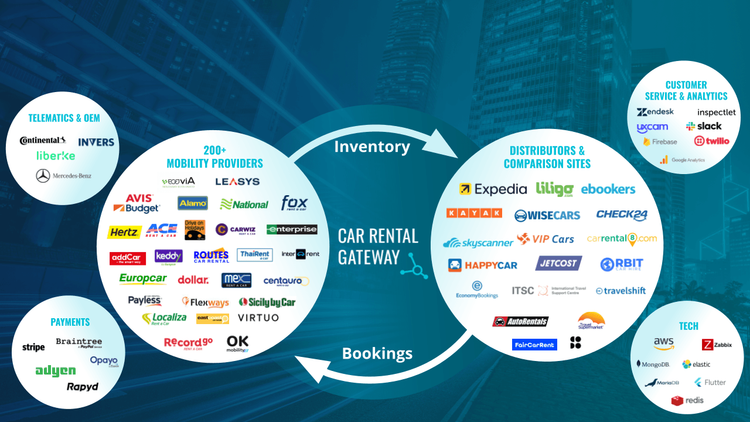
Car Rental Gateway is positioned at the heart of the global mobility ecosystem with market leaders as suppliers and customers.
Distribution to Brokers, OTAs, Affiliates, Airlines
For a rental operator, distribution means sending your own inventory to approved sales channels. If you sell through Expedia, Booking.com, Kayak, airline partners, corporate travel portals or similar channels, the rental software needs a distribution API. Just as importantly, changes in availability, rates, extras or policies at branch level should update those channels in near real time. Ask potential vendors which channels are already supported, how bookings and cancellations flow back, and how channel-specific rules are handled. You should be able to control not only which locations, vehicle categories, rates, and extras each channel receives, but also the commercial terms under which they are offered. This includes supporting different price types, such as net and retail rates, payment models, product packages, commissions, and partner-specific conditions. The system should make it easy to configure different products and terms for different partners without unnecessary manual work.
The goal is clear, flexible multi-channel logic without relying on manual imports, exports, or repeated partner portal updates.
API Connectivity and Documentation
In modern rental tech, open APIs are crucial. Check that the vendor exposes documented APIs, often REST/JSON or REST/XML, for the functions that matter to operators. Availability, rate rules, reservations, modifications, cancellations, customer data and payments are commonly exposed through APIs. More advanced platforms also provide webhooks and event-driven integrations, allowing partners to receive real-time operational updates, such as vehicle check-out, rental extensions, returns and no-shows.
Good documentation with examples makes integrations easier. For your use, well-documented APIs mean you can connect other tools such as accounting systems, CRMs, telematics platforms, payment providers, customer journey tools and distribution partners. Verify that there is a sandbox or test environment so developers can try calls before going live. The more flexible the API support, the easier it is to add new channels or tools later.
Security, User Permissions, Privacy, Compliance
Finally, ensure the software is secure and compliant. It should have role-based access control so that staff only see and do what they’re authorized for (e.g. a salesperson might book cars but not void fraud complaints). Look for encrypted data storage and secure network communications (HTTPS). The vendor should be compliant with relevant data regulations: for example, GDPR for customer data in Europe, PCI-DSS for payments, and any local travel/tax rules. Ask about data residency if that matters (e.g. servers in your country). Also check their support for disaster recovery (regular backups) and uptime statistics. A good vendor will have written privacy policies and procedures for data breaches. While not a flashy feature, security and compliance are essential for protecting your business and customers.
Integration Questions Buyers Should Ask
Distribution APIs
Question to ask: Which sales channels can the system connect to today, and how much control do we have over rates, inventory and availability by channel?
Why it matters: Rental operators need to sell through external channels without updating each partner manually. They also need control over which cars, rates, locations, and rules each channel receives.
Good vendor answer: “The system can distribute live availability, rates, vehicle classes, extras, and policy rules to approved sales channels. Bookings from those channels flow back into the same system, and you can control which inventory and rates each partner receives.”
Partner and system integrations
Question to ask: Can the system connect to our existing rental management system, website, payment provider, accounting tool, CRM, telematics provider, and partner platforms?
Why it matters: Most operators already use several systems. The software should reduce duplicate work, not create another isolated tool.
Good vendor answer: “The system connects with common rental, payment, accounting, CRM, telematics, and partner systems through APIs or supported integrations. We confirm the exact setup during implementation.”
Payment Providers
Question to ask: Which payment gateways are supported (cards, wallets, BNPL)? How are refunds and disputes handled?
Why it matters: Critical for checkout and financial reconciliation.
Good vendor answer: “Our platform integrates with Stripe, Adyen, Apple Pay, Google Pay, and major gateways. All card data is tokenized securely. Refunds can be issued directly from the system, and all transactions auto-reconcile with your accounting.”
ID Verification
Question to ask: Can the software integrate with third-party ID checks or document scanning?
Why it matters: Verifying drivers ahead of arrival speeds pickup and reduces fraud.
Good vendor answer: “We support partners like Jumio or TrustID. When a booking is made, we call the ID service to verify the license/passport. The rental cannot start without successful verification, and data flows into the contract.”
Telematics / IoT
Question to ask: Does it connect to GPS/telematics devices or OEM APIs? How does it import vehicle data (location, fuel, maintenance)?
Why it matters: Enables live tracking, safety alerts, and readiness checks.
Good vendor answer: “Yes, the system can connect to telematics providers such as Webfleet, Geotab, or OEM vehicle data feeds. It can import vehicle location, mileage, fuel or battery level, and maintenance alerts. This helps rental teams see whether a vehicle is back, where it is, and whether it is ready for the next reservation.”
Accounting / ERP
Question to ask: How does it export or integrate financial data? Supports taxes, invoicing and ledger sync?
Why it matters: Needed for end-of-day revenue accounting and compliance.
Good vendor answer: “Our software automatically generates invoice files and journal entries. We offer direct connectors for QuickBooks, Xero, SAP, etc., and support multi-currency and tax regimes. Each payment and invoice can be auto-posted to your ledger.”
CRM / Loyalty
Question to ask: Can customer data sync with a CRM (Salesforce, HubSpot)? Support loyalty points integration?
Why it matters: Keeps guest profiles updated and enables targeted marketing.
Good vendor answer: “We have APIs to push customer profiles to CRM platforms. Customers can earn and redeem loyalty points – data flows both ways. For example, a rented car shows up in the CRM’s customer history for follow-up campaigns.”
Messaging / Email/SMS
Question to ask: Does it handle automated customer notifications? Can you plug in SMS or email providers?
Why it matters: Improves customer communication (confirmations, reminders).
Good vendor answer: “Notifications (booking, pickup, return, payment) are built-in. You can customize templates. We integrate with Twilio, MailGun, or your preferred messaging service, and you can trigger emails/SMS at any stage.”
Insurance & Claims
Question to ask: Does it track insurance products or integrate with an insurance platform?
Why it matters: Simplifies selling waivers and processing damage claims.
Good vendor answer: “Our contracts module can add Collision Damage Waiver (CDW) or other coverages automatically. It logs insurance details and claims. We can connect to InsureTech APIs if you want custom insurance products.”
Reporting / BI
Question to ask: Is there a data warehouse or BI connector (ODBC/REST)? Can custom reports be built?
Why it matters: Allows deep analysis beyond built-in dashboards.
Good vendor answer: “We supply a live data feed or monthly data dump. We’ve worked with Power BI/Tableau for custom analytics. Standard reports cover utilization, revenue, sources, etc. You can also query the database directly if needed.”
Partner Onboarding
Question to ask: What is the process to add a new sales channel or integration partner? How long does integration take?
Why it matters: Affects speed to market as you expand channels and partnerships.
Good vendor answer: “Adding a new sales channel follows a defined onboarding process: scoping, API access, mapping, testing, certification, and go-live. Timelines depend on partner requirements, but we explain the steps, owners, and dependencies before work starts.”
Uptime & Support
Question to ask: What are your SLA and support hours? How do you handle system outages?
Why it matters: Rental systems must be reliable 24/7; downtime costs money.
Good vendor answer: “We guarantee 99.9% uptime. Our support team is on call 24/7. In Europe and North America, we have on-call engineers and real-time monitoring. We alert clients immediately if any critical issue arises.”
Data Ownership
Question to ask: Who owns the booking and customer data? How easily can we export our data?
Why it matters: Ensures you retain access to your business information.
Good vendor answer: “Clients own all their data. You can export reservations, customer lists, and financial records at any time. In case you switch vendors, you keep full data access.”
Rate & Availability Latency
Question to ask: How quickly do rate, availability, and policy changes update across channels? Does the system push updates, support on-demand checks, or use cache?
Why it matters: Prevents stale availability, price mismatches, and overselling across channels.
Good vendor answer: “Rate and availability changes update channels in near real time. Static content can be cached, but live availability, pricing, and booking confirmation are checked through the API. The system monitors failed updates and alerts the team.”
These questions will reveal how well a vendor’s technology fits your ecosystem. A good answer is specific and shows proven integrations, not vague promises of “lots of APIs.”
Build, Buy, or Connect?
When choosing software, operators often weigh four approaches:
- Build in-house: Developing your own system can, in theory, give you exactly what you want. In reality, it is expensive and slow. You need developers experienced in travel tech, payments, fleet logic, pricing, availability and channel connectivity. You also have to maintain the booking engine, distribution layer, payment logic, reporting and security controls after launch. This path only makes sense if you have very specific needs and enough technical capacity to maintain the system long term.
- Buy an all-in-one system: Off-the-shelf rental software can speed up launch. All-in-one suites promise to handle bookings, fleet, and reporting out of the box. The trade-off is flexibility: the vendor’s way of doing things must fit your way. If the software uses fixed workflows or clunky modules, you may end up adjusting your business to the tool. Another risk is vendor lock-in. On the plus side, one vendor means one support contact and integrated features. This makes sense if you’re a small operator or want a turnkey solution.
- Use a distribution API: If your existing operational system works but external channel distribution is the gap, a distribution API may be the right middle path. It can connect your rates, availability, extras and booking rules to brokers, OTAs, airlines, affiliates and comparison sites without replacing every operational tool. The risk is that distribution only works well if your source data is clean and your operational system keeps inventory accurate.
No single choice is always best. Small shops might start with a simple all-in-one system and skip complex APIs. Larger operators and networks often combine a rental management system with payment, telematics, accounting and distribution tools through APIs.
Car Rental Software Checklist
Use this operator-focused checklist during demos and vendor comparisons:
- ✅ One-way rentals: Can it handle pick-up/drop-off at different locations with correct fees?
- ✅ Multi-brand/Locations: Supports multiple branches, subsidiaries or brands in one system?
- ✅ ACRISS code mapping: Does it use ACRISS vehicle codes so vehicle classes stay consistent across locations, websites and sales channels?
- ✅ Extras & policies: Can it sell and manage optional extras (child seats, GPS, etc.), fees (age, cross-border), and local policies?
- ✅ Channel connectivity: Can it connect your rental inventory to brokers, OTAs, affiliates, airlines, wholesalers or comparison sites?
- ✅ Channel control: Can it control which locations, vehicles, rates, extras and rules each channel receives?
- ✅ Payments & invoicing: Does it process secure payments (online and at desk) and generate invoices automatically?
- ✅ Damage & maintenance: Can it log damage reports, track claims, and schedule vehicle maintenance?
- ✅ Keyless check-in: If needed, does it support mobile check-in, digital keys or integration with a keyless platform?
- ✅ Ease of use: Can non-technical staff operate it for daily tasks? (Is the UI intuitive?)
- ✅ Scalable: Will it grow with you without manual workarounds?
- ✅ Uptime & support: Does the vendor guarantee high uptime and offer responsive support?
- ✅ Integration experience: Can the vendor show case studies or examples of integrations they've done in your markets or with similar partners?
If many answers are “no,” the software may not be a complete fit.
Red Flags to Watch For
Watch out for these warning signs during demos and trials:
- Hidden manual work: The vendor boasts “automation,” but fields still must be manually updated or spreadsheets imported.
- Poor API documentation: If developers say the API docs are confusing or incomplete, integrations will be costly.
- Unclear support process: No defined SLA or support ticket system. If you can’t find who to call when things break, that’s bad.
- No real-time logic: Availability or rates do not update quickly, which can lead to double bookings, stale pricing, or partner channels selling inventory that is no longer available.
- Weak channel control: The system cannot clearly show how inventory, rates, extras or rules are restricted by channel, location or partner.
- Poor vehicle class or extras handling: ACRISS codes, local fees, child seats, EV items or young-driver rules are inconsistent across channels.
- Inflexibility on local rules: The vendor cannot explain how it will handle unique local fees or insurance differences. Every country and company has quirks, so make sure the software can adapt.
- Vague implementation plan: The vendor cannot outline clear steps for getting you live, such as data migration, channel setup, integration testing and training. Beware of “just jump in and figure it out.”
- Demo vs. reality gap: The software looks great with sample data, but on a trial with your real scenarios it fails (e.g., one-way rentals break, or it can’t price a long-term booking). Always do a realistic pilot.
Pay attention if something feels too good to be true: the right car rental system will be stable and handle edge cases, not just the happy path.

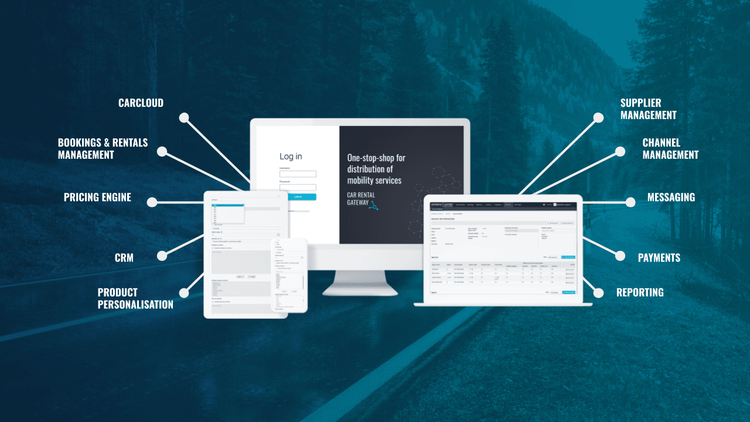
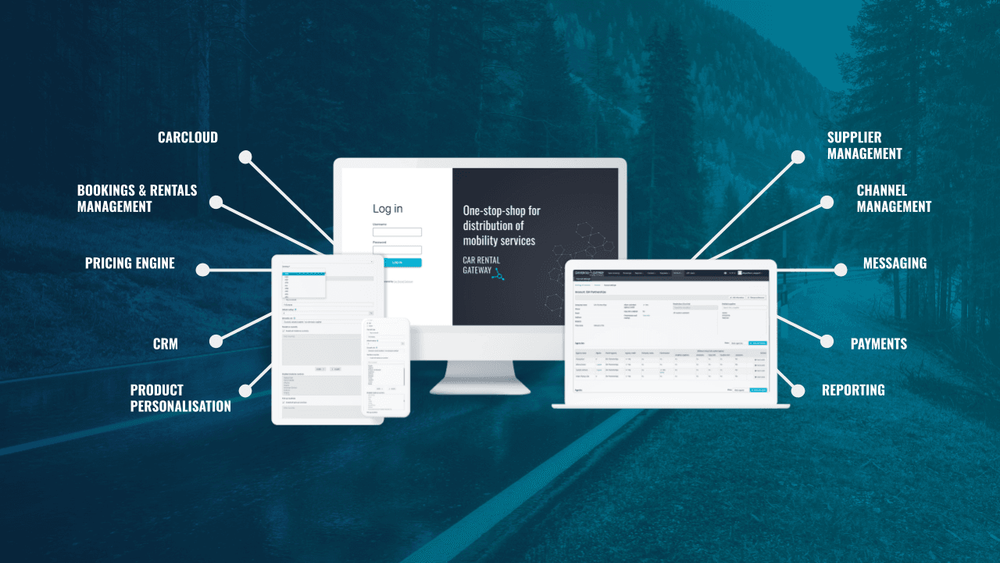
Car Rental Gateway's CarCloud is a complete car rental platform for smarter, more efficient, and future-proof rental operation.
Where Car Rental Gateway Fits
Car Rental Gateway is relevant for rental operators that need API-first distribution, partner connectivity, consistent rental data, and connected rental operations.
For a rental operator, the main distribution question is usually simple: how can we send our rates, vehicle classes, extras, policies, location rules, and booking conditions to brokers, OTAs, affiliates, airlines, wholesalers, and comparison sites without managing every channel separately?
This is where CRG’s distribution API can help. It gives operators a way to connect their rental inventory to external sales channels through one platform. Bookings can flow back into the same setup, while the operator keeps control over which locations, cars, rates, extras, and policies are available to each partner.
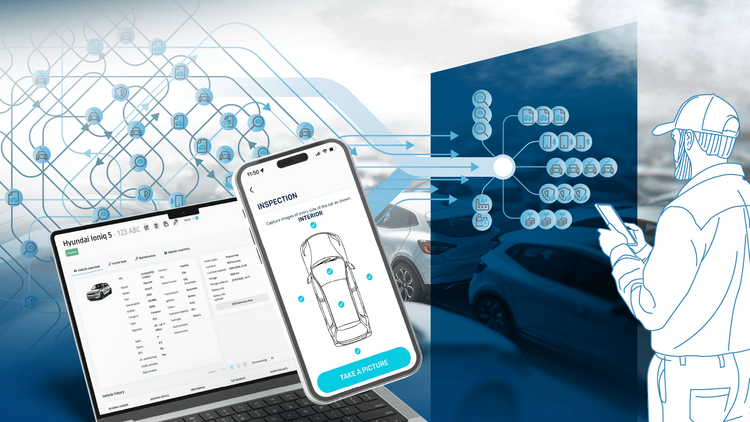
CarCloud is designed to help operators maximise efficiency, profitability, and customer satisfaction in today’s competitive market.
CRG is also relevant when an operator needs more than distribution. CarCloud is an example of a platform that brings distribution, fleet, pricing, payments, tasks, damage, and customer journey tools into one connected setup. This can matter for operators that are moving away from spreadsheets, separate fleet tools, or older systems that do not share data well.
For example, a multi-location rental operator may want branch teams to manage vehicles, tasks, inspections, and payments locally, while the head office sees fleet use, pricing, bookings, and partner performance across all locations. A franchise or affiliate network may need consistent vehicle classes, extras, policies, and reporting across markets, while still allowing local teams to manage local rules.
CRG is not the only possible answer. Some operators choose a traditional rental management system. Others build internal tools or connect several specialist systems through APIs. CRG is most relevant when the buyer needs distribution connectivity, consistent rental data, and connected operations in the same ecosystem.
Evaluation Framework
Use this simple scoring grid to rate potential solutions (1=poor fit, 5=excellent fit). Adjust weights based on your priorities.
Operational fit
1 (Poor): Software forces big changes in how you work; many gaps remain between your process and the tool.
5 (Excellent): Workflow maps naturally to your needs; minimal manual work. Branch tasks (check-in, cleaning) follow logically in the system.
Distribution fit
1 (Poor): Limited channel support; if a new channel is needed, it is complex to integrate or requires manual updates.
5 (Excellent): Easy multi-channel distribution with control over which inventory, rates, locations, extras and rules each channel receives.
Integration fit
1 (Poor): Hard to connect your existing systems (payments, CRM, accounting).
5 (Excellent): Provides APIs, connectors or built-in links for all essential systems.
Data quality
1 (Poor): Missed or incorrect vehicle classifications, extras or policy data; manual cleanup needed.
5 (Excellent): Standard codes (ACRISS), consistent extras and unified formats keep data consistent across branches and channels.
User experience
1 (Poor): Clunky interface; staff training takes a long time.
5 (Excellent): Intuitive UI; staff can perform tasks (book, check-in, report) with minimal support.
Reporting
1 (Poor): Only basic reports; no drill-down or export.
5 (Excellent): Robust analytics: prebuilt and customizable reports, dashboards, data export.
Scalability
1 (Poor): Performance slows or workarounds needed as the fleet grows.
5 (Excellent): Handles expansion (more cars/locations) without extra manual processes or lag.
Vendor support
1 (Poor): Slow or no support; no clear SLA; poor documentation.
5 (Excellent): Clear SLA, thorough documentation and onboarding help.
Total Cost of Ownership
1 (Poor): High hidden costs (extra modules, custom dev); hardware/infrastructure needed on-prem.
5 (Excellent): Transparent pricing; SaaS/cloud model with included updates; predictable ongoing fees.
Implementation Risk
1 (Poor): Takes very long to go live (many months); requires heavy technical work.
5 (Excellent): Reasonable timeline (weeks to a few months) with clear milestones; vendor has a proven onboarding process.
Score each category 1–5 based on how well the vendor’s proposal fits your needs. This helps compare very different options in a structured way.
FAQ
What is car rental software?
Car rental software is the technology system that powers a car hire business. It includes the online booking engine customers use, as well as the back-office tools agents use to manage cars, contracts and customers. In practice it covers reservation handling, fleet tracking, rate management, payments/invoicing and often distribution to online partners. A rental management system automates manual tasks (like double-booking checks and payment receipts) so the operation runs smoothly.
What is the most important feature in car rental software?
Real-time inventory and reservation logic is usually the top feature. If the software can’t reliably show which cars are available when, every other feature fails. Live availability updates and instant booking confirmations are critical. Closely behind that are price rule flexibility, payment handling and clear reporting. In short, accuracy in availability, pricing and payments should come first.
How is rental booking software different from car rental management software?
Booking software is the customer-facing engine: search, choose dates and cars, see prices, add extras and reserve online. Management software, sometimes called the rental operations system, is the behind-the-scenes platform: fleet control, contracts, deposits, damage logs, payments and reporting. A booking system helps you sell rentals. A management system helps you run the rental day. A complete solution connects both.
Why do ACRISS codes matter?
ACRISS codes are a standardized four-letter classification for cars, covering size, type, transmission and fuel. They help operators describe vehicle classes consistently across branches, websites and sales channels. For example, “CCMR” should mean the same class whether the customer books on your website, through an OTA, or at the counter. If your software mishandles ACRISS, customers may see unclear vehicle classes, and pricing or reporting may not align across channels. Good rental systems let you map your fleet models to ACRISS codes and keep vehicle class logic consistent.
What integrations should car rental software have?
At minimum, it should integrate with online sales channels, payment gateways and accounting systems. Ideally, it should also connect to ID verification services, SMS/email tools, CRM or loyalty systems, telematics providers and reporting tools. The key is that systems share data without duplicate entry. For example, a booking should connect to the right contract, payment, invoice, vehicle status and customer profile.
Should I choose cloud-based or custom software?
Most operators benefit from a cloud (SaaS) solution today. Cloud software means no servers to maintain, automatic updates, and easier remote access. It usually costs less upfront. Custom (on-premise) software can fit unique processes exactly but is expensive to build and hard to update. Go custom only if you truly need something no standard product can do, and be prepared for a long implementation. Otherwise, a good cloud system will cover most needs and evolve with the industry.
When do I need a car rental API?
You need a car rental API when your rental business must connect booking, fleet, pricing, payments, telematics, accounting, customer journey tools or external sales channels. API-first software becomes more important when you sell through brokers, OTAs, affiliates, airlines or comparison sites and cannot manage each channel manually. If you are only taking walk-in rentals at one location, an API may not be critical. Once you need real-time partner updates or internal system connections, APIs become important.
How long does implementation take?
Implementation time varies with complexity. A small operator adding one local system might be live in 4-8 weeks if data migration is simple. A larger operator connecting several locations, payment tools, telematics, accounting and external sales channels could take 4-6 months. Key factors include number of locations, data conversion, integrations, channel setup and staff training. Use the time to test real edge cases, such as long rentals, one-way returns, driver-age rules and extras. A good vendor will outline phases: setup, integration, training and pilot use.
What should I ask during a demo?
Besides seeing basic booking and contract flows, ask the vendor to walk through your specific scenarios: quote a one-way rental, simulate a long-term monthly booking, add young-driver fees, add multiple extras, block a vehicle for maintenance and process a late return. Request to see the API documentation or sample calls. Ask how a new car, new location, new fee or new sales channel is added. For each channel, ask how bookings and cancellations return to your system. Finally, ask for customer references from a similar-size operator.
How do I compare vendors fairly?
First, use a consistent checklist (like the one above) so you evaluate the same criteria for each. Second, prioritize your must-haves vs nice-to-haves, and weigh vendors accordingly. Don’t choose solely on feature count; instead, consider how those features fit your process. Check for data portability (who owns the data, how you export it). Compare total cost (software license + integration + maintenance). Ideally, run trial accounts on two or three finalists so your team can try real tasks. Lastly, trust indicators matter: look for well-known partners, positive reviews, and clear communication from the vendor.
Conclusion
The “best” car rental software isn’t the one with the longest feature list, it’s the one that fits your business model and makes operations smoother. The right system will cut out manual fixes and keep data consistent across bookings, pricing, channels and branches. It should connect you to the partners you depend on, such as OTAs, brokers, payment providers, accounting tools and telematics platforms, while helping staff serve customers quickly, clearly and reliably.
If you’re evaluating API-first distribution platforms and connected operations for your rental business, consider talking to Car Rental Gateway. CRG can help link your channels, branches, fleet data, payments and customer journey tools through one connected setup. To discuss whether our distribution API or CarCloud platform could fit your company, contact our Product and Sales Manager Hannes Põldvee at hannes.poldvee@carrentalgateway.com or message him on LinkedIn.